



📚 Question Bank Guide
Everything you need to create, manage, and improve your child’s learning
The Question Bank is where your family’s learning system lives.
It allows you to:
The Question Bank is where your family’s learning system lives.
It allows you to:
- Create reusable questions for quizzes
- Track how your child is performing
- Identify strengths, struggles, and patterns
- Continuously improve learning without guessing
Whether you’re just getting started or optimizing your system, this guide will walk you through everything.
🧠 What is the Question Bank?
The Question Bank is your central library of questions used in quizzes.
Each question you create can be:
- Reused across multiple quizzes
- Tracked over time
- Improved based on real performance data
💡 Think of it like a “smart learning engine” — not just questions, but insights.
🌱 Starter Questions (Already Included)
When you first open the Question Bank, you’ll see that starter questions are already loaded.
These are designed to:
- Help you explore how quizzes work
- Give your child something to start with immediately
- Show examples of different question types
You can:
- Use them as-is
- Edit them
- Or create your own from scratch
➕ Creating Questions
To add new questions:
- Tap “New question”
- Or “Create a custom question”
You’ll be able to:
- Create questions with Smart Assist
- Choose question type (multiple choice or input)
- Set correct answers
- Add topics, difficulty, and more
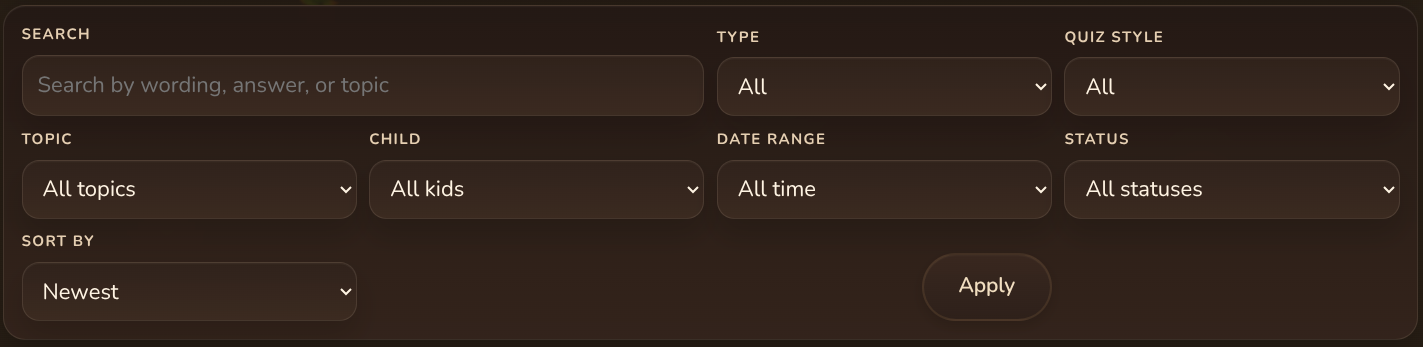
🔍 Finding & Filtering Questions
As your library grows, filters help you stay organized.
You can filter by:
- Type (multiple choice, input)
- Quiz style
- Topic
- Child
- Date range
- Status
- Sort order
📊 Understanding Your Questions
Each question shows helpful performance data:
- Accuracy % → How often it’s answered correctly
- Times shown → How often it has appeared
- Last updated → When it was last modified
This helps you quickly identify:
- Questions that are too easy
- Questions that are too hard
- Questions that may need improvement
⚙️ Managing Questions
For each question, you can:
- View → See how it appears to your child
- Edit → Update wording, answers, or difficulty
- Shuffle choices → Prevent memorization patterns
- More/Delete → Permanently deletes the question.
⭐ Smart Assist Insights (Premium)
The real power of the Question Bank comes from Smart Assist analytics and recommendations.
These features help you move from guessing → to data-driven parenting.
📈 Analytics Overview
The Analytics section gives you a complete breakdown of learning performance.
Key metrics include:
- Total tracked questions → Questions actively being used
- Likely memorized → Questions your child may be recognizing instead of learning
- Too easy / Too difficult → Difficulty balance insights
- Frequently missed → Problem areas
- Needs review → Questions that should be updated
💡 This helps you instantly understand what’s working and what’s not.
📉 Usage Over Time
See how often quizzes are being completed.
This helps you:
- Track consistency
- Spot drops in engagement
- Build better routines
🎯 Accuracy Distribution
Breaks down performance into ranges:
- 0–39%
- 40–59%
- 60–79%
- 80–94%
- 95–100%
💡 This gives you a big picture view of difficulty balance
🔥 Most-Used Questions
Shows which questions appear the most.
Use this to:
- Identify overused questions
- Rotate content to keep things fresh
❌ Most-Missed Questions
Highlights where your child struggles the most.
👉 These are your highest-value improvement opportunities
✅ Never-Missed Questions
Questions your child always gets right.
These may be:
- Fully learned ✔️
- Or memorized ⚠️
⚠️ Memorization Risk
Smart Assist detects patterns where kids may be:
- Recognizing answers instead of understanding
This helps you:
- Reword questions
- Shuffle answers
- Reinforce real learning
👧 Per-Child Performance
See how each child is doing individually.
You can:
- Compare progress
- Spot who needs help
- Adjust learning for each child
📊 Topic Performance
The Topic Performance section helps you understand how your child is doing across different subjects and categories.
Each topic shows:
- Number of questions in that category
- Average accuracy for that topic
This helps you quickly spot:
- Strong areas (high accuracy)
- Weak areas (low accuracy)
- Topics that may need more variety or better question wording
💡 How to use this effectively:
If a topic has low accuracy:
If a topic has low accuracy:
- Your child may not fully understand the concept yet
- Try creating easier version of those questions
- Add help text or visuals to support learning
- Break the skill into smaller steps
If a topic has very high accuracy:
- Your child may have mastered it
- Or they may be memorizing patterns
In that case:
- Create new variations of the same concept
- change wording or context
- Try switching from multiple choice to input.
- Increase difficulty slightly
A balanced Question Bank has a mix of:
- Improving topics
- mastered topics
- and ares still being explored
📌 Question-Level Insights
Each individual question provides detailed performance insights.
You may see information such as:
- Accuracy percentage
- Total uses (how many times it has appeared)
- Children affected (who has seen it)
- Last used (recency)
- Memorization risk score
These insights help you understand not just what your child answered, but how the questions is functioning overall.
📊 Accuracy
This shows how often the questions is answered correctly.
Use this to decide:
Use this to decide:
- Too high → may be too easy or memorized
- Too low → may be too difficult or unclear
A "perfect" score is not always the goal.
A good questions should help you learn something about your child's understanding.
A good questions should help you learn something about your child's understanding.
⚠️ Memorization Risk
This is one of the most powerful insights in RewardRoots.
It estimates whether your child is:
- truly understanding the question
- or recognizing the answer pattern
A high memorization score means:
- your child may be answering correctly without thinking deeply
💡 What to do when memorization risk is high:
- Refresh answer order
- Rewrite the question wording
- Create a similar question with different context
- Convert to input instead of multiple choice
- Add a slightly harder version
The goal is to protect real learning, not just correct answers.
🔄 Refresh Answer Order
You can quickly reshuffle answer choices to reduce memorization.
This is useful when:
- a child remembers the position of the correct answer
- accuracy is high but true understanding is unclear
It is a fast way to "reset" a question without rewriting it.
🚀 The Bigger Picture
The questions banks is not just a collection of questions.
It becomes a feedback system that helps you:
- understand your child's learning patterns
- adjust difficult in real time
- reduce frustration
- build confidence
- and improve outcomes over time
The more use use analytics to guide your next question, the more powerful your system becomes!
💡 Recommendations (Premium)
Smart Assist also provides actionable recommendations, such as:
- “These questions may be too easy”
- “Consider reviewing these topics”
- “This question may be memorized”
This removes the guesswork and helps you:
👉 Continuously improve your system with confidence
🚧 Limits (Free vs Premium)
Free Plan
- Up to 75 questions
- Access to core Question Bank features
Premium
- Unlimited questions
- Full analytics
- Smart Assist recommendations
- Advanced insights and optimization tools
🧩 Best Practices
Here’s how to get the most out of your Question Bank:
✔ Start with a mix of easy and challenging questions
✔ Review analytics weekly
✔ Update or replace frequently missed questions
✔ Shuffle choices to prevent memorization
✔ Use insights instead of guessing
🚀 What’s Next?
Now that you understand the Question Bank, you’re ready to:
👉 Create better questions
👉 Track real learning progress
👉 Build a system that actually works